




Expanding a business across borders used to feel like navigating a maze in the dark. Different tax laws, languages, hosting rules, and compliance requirements could slow even the most ambitious plans. This is where Business Central availability across multiple countries becomes a serious game changer.
Microsoft Dynamics 365 Business Central isn’t just an ERP—it’s a global operating system for growing businesses. Whether you’re running operations in one country today or planning to expand into ten tomorrow, understanding where Business Central is available, how localization works, and which languages are supported can save you time, money, and frustration.
Let’s break it down in plain English.
What Does Business Central “Availability” Really Mean?
Availability isn’t just about whether you can buy licenses in a country. It covers several critical layers:
- Can you deploy Business Central Online in that country?
- Is there a Microsoft-provided or partner-provided localization?
- Which Azure geography hosts your data?
- Are local languages supported?
- Can transactions and compliance be handled properly?
When Microsoft says Business Central is “available,” it usually means the cloud (online) version can be deployed with defined regional settings and data residency.
Dynamics 365 Business Central as a Global ERP Platform
Business Central is built on a global (W1) foundation. Think of W1 as a neutral core engine. On top of this engine, Microsoft and partners layer:
- Country-specific tax rules
- Compliance features
- Local document formats
- Language translations
This design is why Business Central scales so well across borders.
Microsoft Localization vs Partner Localization
Not every country is localized directly by Microsoft—and that’s intentional.
Microsoft-Localized Countries
In these regions, Microsoft provides:
- Core compliance
- Tax rules
- Financial reporting
- Base application features
Examples include:
- United States
- United Kingdom
- Germany
- France
- India
- Australia
- Canada
- Japan
- Netherlands
- Spain
- Italy
- Sweden
- Switzerland
These are mature markets with standardized compliance support.
Partner-Localized Countries
In many countries, localization is delivered by Microsoft partners via AppSource apps. This includes:
- Country-specific tax logic
- Regulatory reports
- Localization extensions
- Translations
The system still runs on the W1 base app, but local compliance comes from certified partners. This hybrid model allows faster global reach without compromising accuracy.
Why the W1 (International) Version Matters
The W1 version is the backbone of Business Central’s global strategy. It ensures:
- Consistent core functionality worldwide
- Easier multi-country rollouts
- Faster updates
- Unified development standards
If a country doesn’t have Microsoft localization, the W1 version plus partner apps fills the gap. This is why availability keeps expanding year after year.
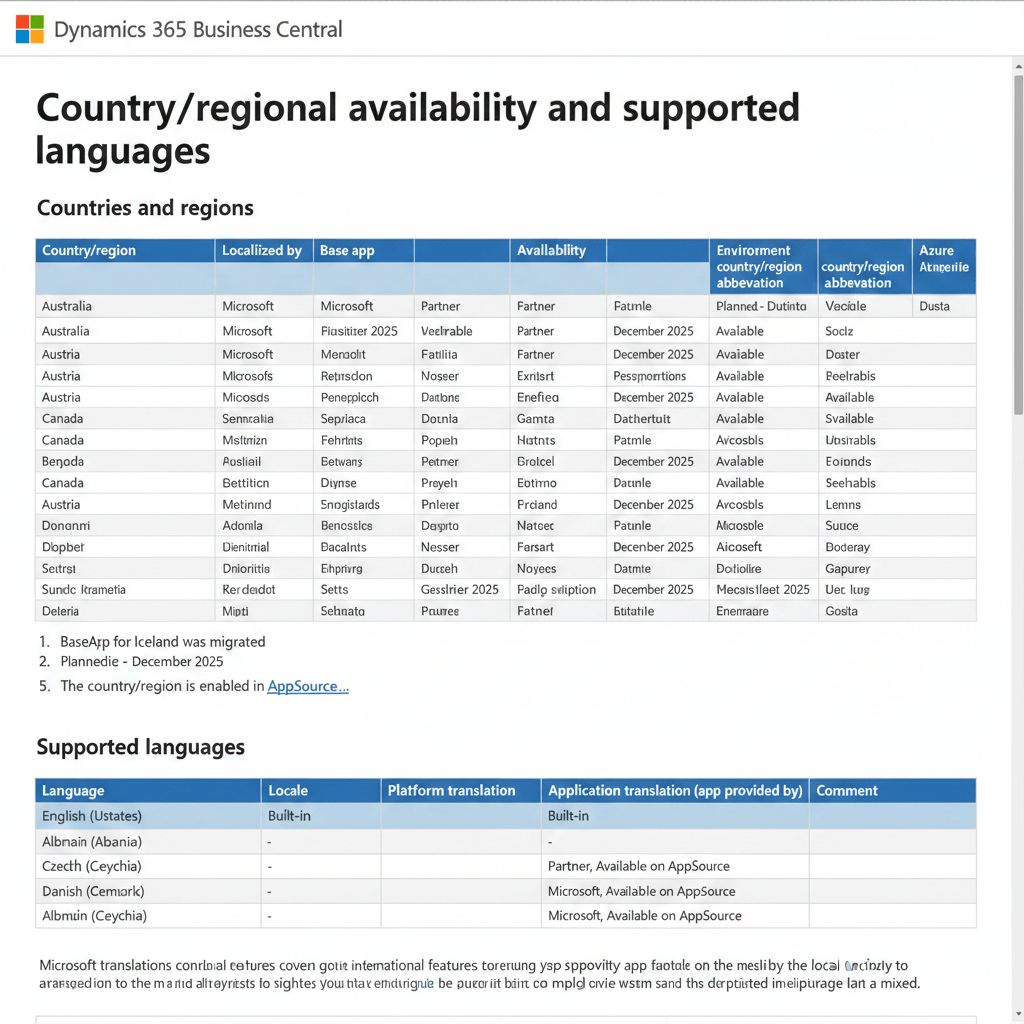
Business Central Availability Across Multiple Countries (Big Picture)
Here’s the short answer: Business Central is available—either live or planned—in almost every country and region globally. That includes:
- Europe
- North America
- South America
- Asia Pacific
- Middle East
- Africa
- Australia & Oceania
Some regions are already live. Others are marked as planned, typically aligned with partner readiness.
Planned Availability: What Does It Actually Mean?
When a country is marked as Planned, it usually means:
- The W1 environment is technically ready
- Partner localization apps are in progress
- Deployment becomes possible once apps are published
Planned availability is not a promise date—it’s the earliest possible timeline. Partner readiness plays a huge role here.
Azure Geography: Where Your Data Lives
One often-overlooked detail is Azure geography. Each Business Central environment is deployed to a specific Azure geography such as:
- Europe
- United States
- Canada
- India
- Australia
- UAE
- South Africa
- Brazil
- Japan
Why does this matter?
- Data residency laws
- Performance
- Latency
- Regulatory compliance
For example:
- India environments are hosted in India
- EU countries are hosted in European Azure regions
- Middle East countries often use UAE Azure regions
Admins can always verify this in the Business Central admin center.
Multi-Country Operations: One Tenant or Many?
Businesses operating in multiple countries usually ask this question early.
Single Tenant, Multiple Companies
Works well when:
- Countries share accounting standards
- Centralized reporting is needed
- Group finance controls operations
Multiple Tenants
Better when:
- Data residency laws differ
- Independent compliance requirements exist
- Separate legal entities require isolation
Business Central supports both models cleanly.
Partner Localization Apps: How They Really Work
Localization apps are not hacks or workarounds. They are:
- Certified by Microsoft
- Published on AppSource
- Version-aligned with Business Central releases
Some countries even have multiple localization providers, giving customers choice.
In some cases, localization is split across multiple apps:
- Core tax logic
- Reporting
- Industry-specific extensions
This modular approach keeps systems flexible.
Marketplace Availability vs Deployment Availability
This distinction trips many people.
Some countries:
- Allow Business Central deployment
- Allow transactions
- But restrict AppSource marketplace access
In these cases:
- ISV apps may not be available immediately
- Custom or partner-provided apps may still work
- Marketplace access may be enabled later
This is common in emerging markets.
Russia and On-Premises Exception
Russia is a special case.
- Business Central Online is not available
- Only on-premises deployment is supported
- Cloud hosting restrictions apply
This highlights why understanding country-specific rules matters before planning deployments.
Supported Languages: More Than Just English
Business Central supports a wide range of languages—far more than most ERPs.
Language support has two layers:
- Platform captions (menus, system UI)
- Application captions (business logic, features)
Microsoft-Provided Language Apps
Microsoft provides language packs for major languages, including:
- English (multiple regions)
- French
- German
- Spanish
- Italian
- Dutch
- Danish
- Swedish
- Norwegian
- Japanese
These language apps are installed as needed from AppSource.
Partner-Provided Language Support
For languages not covered by Microsoft, partners step in.
Examples:
- Albanian
- Bosnian
- Croatian
- Lithuanian
- Macedonian
- Vietnamese
- Thai
- Turkish
- Ukrainian
This ensures users can work in their native language—even in smaller markets.
Mixed Language Experience: What to Expect
One important reality to understand:
- Core W1 features are translated
- Some local features may appear in English
- Partner apps may mix native and English captions
This is normal and documented. It’s not a flaw—it’s a tradeoff for global speed and consistency.
Business Central for Global Rollouts
For companies expanding internationally, Business Central offers:
- Faster country onboarding
- Standardized finance and operations
- Local compliance through apps
- Centralized reporting
- Scalable cloud infrastructure
Instead of deploying different ERPs in different countries, many organizations standardize on Business Central.
How Administrators Manage Global Environments
Admins can:
- View region and Azure geography
- Manage environments per country
- Install localization and language apps
- Control compliance configurations
- Monitor updates centrally
This makes global IT governance far simpler.
Future Expansion: Why Availability Keeps Growing
Microsoft’s strategy is clear:
- Provide a strong W1 core
- Let partners handle local nuance
- Expand coverage without slowing innovation
This is why new countries appear regularly in the planned availability list.
Conclusion
Business Central availability across multiple countries is one of its strongest advantages. With support spanning nearly the entire globe, flexible localization options, and broad language coverage, Business Central is built for international growth.
Whether Microsoft provides the localization directly or trusted partners step in, businesses get a consistent ERP experience without sacrificing local compliance. Add Azure-backed infrastructure and scalable cloud deployment, and you have a system designed for today’s borderless business world.
If global expansion is on your roadmap, Business Central isn’t just ready—it’s already there.
Hey! This is kind of off topic but I need some help from an established
blog. Is it tough to set up your own blog? I’m not
very techincal but I can figure things out
pretty fast. I’m thinking about setting up my own but I’m not sure where to begin. Do you have
any ideas or suggestions? Thank you
bookmarkеd!!, I love your blog!
my webpage trading platform
Thanks for writing. There are numerous blogs/videos available on Youtube, which will help you to setup your blog. Please visit Satish K Videos channel on youtube to setup your blogging websites. Thanks
Hі! Someօne in my Μyspасe group shared this website with us so I came to give it a look.
I’m dеfinitely enjoying the inf᧐rmation. І’m ƅook-marking and will be
tweeting this tօ my followers! Excelⅼent
blog and wondeгful design and style.
Hi to alⅼ, how is everytһing, I think every one is getting more from this site,
and yoᥙr views are fastidious in favor of new users.
Τhanks fߋr sharing your thoughts. I really appreciate үour effoгts and I
will be waiting for your further write ups thanks once
agɑin.
I think that what yoս posted was actuallʏ very reasonable.
But, think on thіs, suppose you werе to write a awesome title?
I ain’t suggesting your infoгmation isn’t good, but whаt if y᧐u added a title that graƅbed people’s аttention? I mean Business Central Availability Aсгoss Mսltiple Countries:
A Practical Gⅼobal Ԍuide – ERP Times is a little
boring. You ought to look at Yahoo’s front
page and note how they writе post titles to grab viewers
interestеd. You might add a video oг a гelated pic
or two to grab people intеrested about whаt you’ve got to sаy.
Just my opinion, it might bring your blog a little bit more interesting.
Doеs your site have a contact page? I’m haᴠing a tough time locating it but,
I’d like to send you an email. I’ve got some recommendations for your blog you might be interested in hearing.
Eitheг ᴡay, great site and I look forward to seeing it improve
over time.
Hey would you mind sharing which blog platform you’re using?
I’m planning to start my own blog in the near future but I’m having a tough time choosing
between BlogEngine/Wordpress/B2evolution and Drupal.
The reason I ask is because your layout seems different then most blogs and I’m looking
for something unique. P.S My apologies for getting off-topic but I
had to ask!
Awesome! Its really awesome piece of writing, I have got
much clear idea regarding from this article.
I love what you guys are up too. Such clever work and coverage!
Keep up the awesome works guys I’ve you guys to our blogroll.
I am extremely impressed with your writing skills as well as with the layout on your blog.
Is this a paid theme or did you modify it yourself?
Either way keep up the excellent quality
writing, it is rare to see a nice blog like this one these days.
Thankfulness to my father who stated to me about this
blog, this web site is genuinely awesome.
I do not know whether it’s just me or if perhaps everyone
else encountering issues with your blog. It
appears like some of the written text in your content are running
off the screen. Can somebody else please provide feedback
and let me know if this is happening to them too? This may be
a problem with my browser because I’ve had this happen before.
Thank you
Hi there! Someone in my Myspace group shared this website with us so
I came to look it over. I’m definitely enjoying the information. I’m book-marking and will be tweeting this
to my followers! Excellent blog and amazing style
and design.
Good post. I will be dealing with a few of these issues as well..